
Bridging the Past, Present, and Future of Tech
Informational Guide: Data Center (DC) Architecture — Definition, Layers, and Role in Modern Infrastructure

Key Takeaways
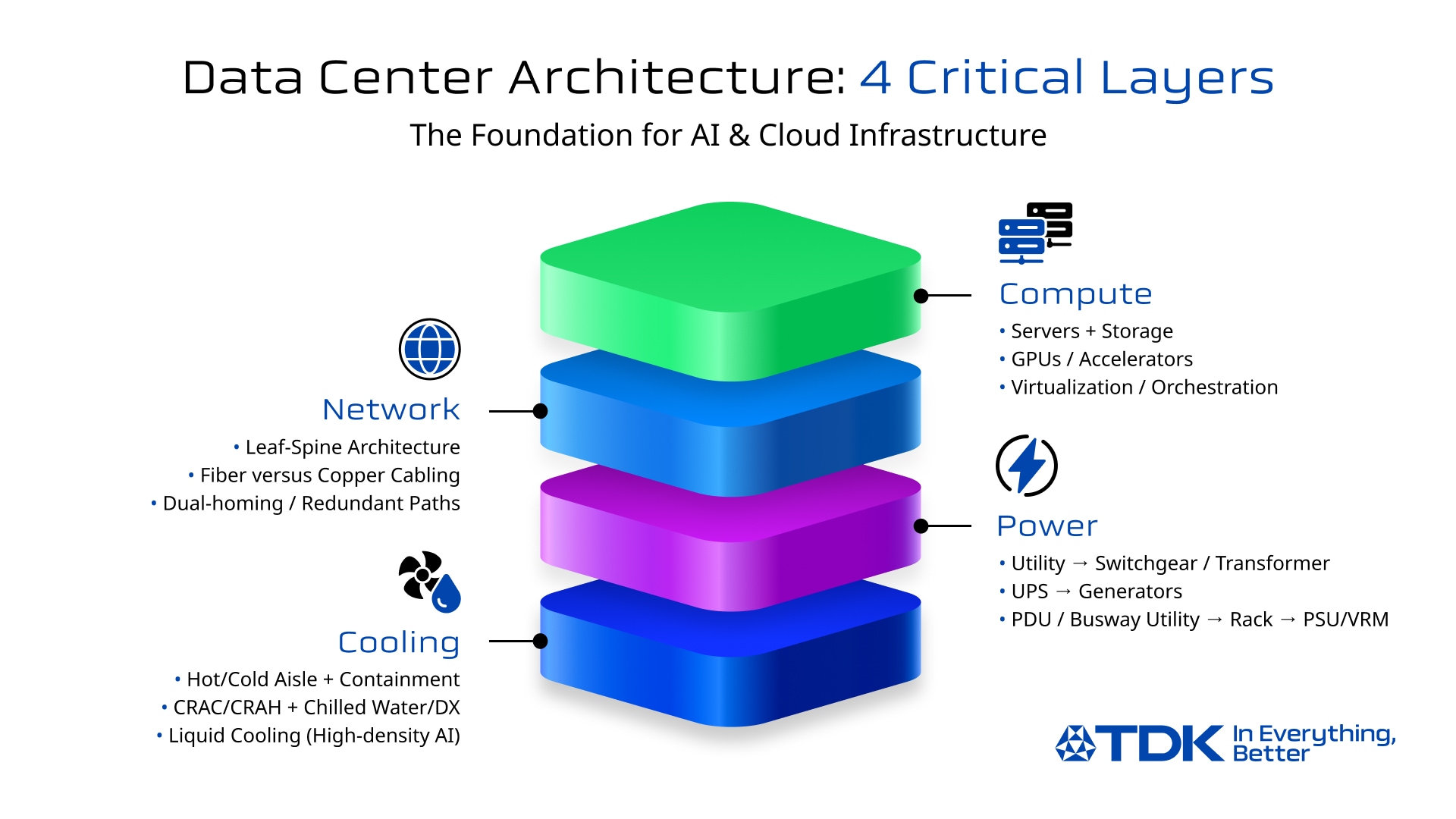
● Data center architecture is best understood as four interdependent layers: compute, network, power, and cooling.
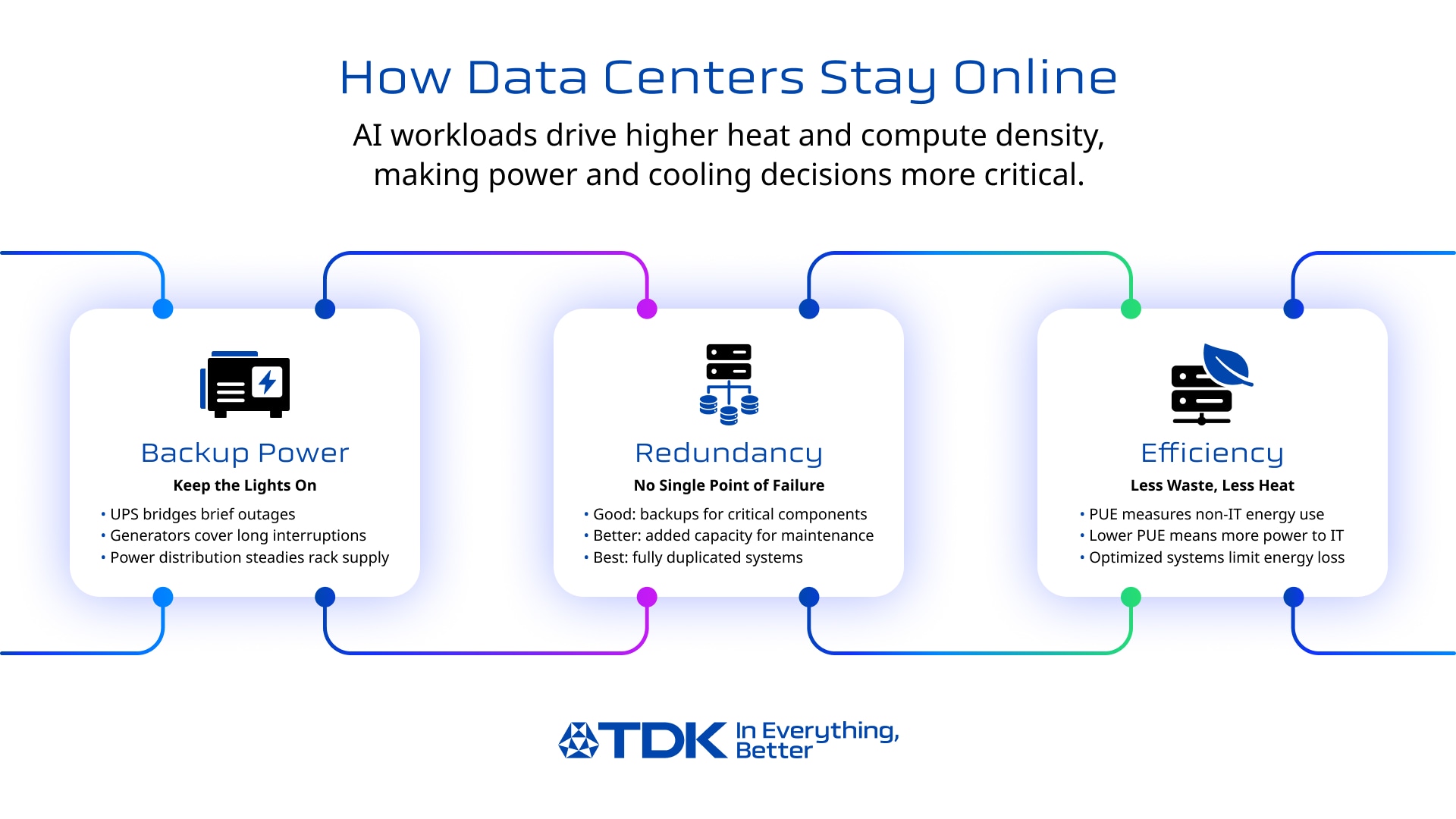
● Uptime is engineered through redundancy choices (N, N+1, 2N), maintainability, and operational discipline, not just “more equipment.”
● Power and thermal strategy are now inseparable as AI workloads increase rack density and heat output.
● Tier levels (I–IV) help align reliability expectations with business needs and cost.
● Reliability depends not only on architecture and redundancy, but also on the quality of components used in power conversion, backup power, and connectivity (e.g., capacitors, inductors, EMC components). It also depends on storage and data-protection design (how data is replicated/protected and how quickly systems can recover data access after a fault).
Why Data Centers Matter More Than Ever
Data centers have become critical infrastructure for cloud services, enterprise systems, streaming, finance, e-commerce, and increasingly AI/ML workloads. As racks get denser and interconnect demand rises, the definition of “a reliable data center” now depends on more than just square footage; it depends on engineered architecture across compute, network, power, and cooling.
In this guide, you’ll learn:
● What a data center is (and how it differs from a server room)
● The main types (enterprise, colocation, hyperscale, edge data centers)
● A practical “four-layer” view of data center architecture
● Reliability basics like data center tier levels (Tier I–IV)
● Operational fundamentals like DCIM (data center infrastructure management), and where trends are heading
As power density rises, the reliability of power-conversion and distribution hardware becomes increasingly essential at AI data centers, especially the quality and lifetime behavior of core components used in UPS systems, inverters, filters, and communications equipment. At the same time, reliability is also shaped by storage resilience choices (e.g., replication/erasure coding, backup strategy, and recovery processes), since “uptime” depends on keeping data available, not only keeping servers powered.
What Is a Data Center?
Definition & Primary Functions
At its core, a data center is a facility that collects, stores, processes, and delivers (serves) data by housing computing and networking infrastructure in a controlled environment. In practical terms, “delivers/serves” means moving data and application responses to users, devices, and other systems over networks (both inside the data center and out to the internet/WAN), not merely storing them.
The key difference between a server room and a true data center lies in engineering and operational maturity. A data center is built around:
● Redundant power and backup power
● Designed cooling and airflow
● Physical security and monitoring
● Documented operations, maintenance, and change control
Main Types of Data Centers
Most deployments fall into four categories:
● Enterprise data centers: Owned/operated by a single organization (often for compliance, control, or predictable workloads).
● Colocation (colo): A provider operates the facility; customers rent space/power/cooling and deploy their own hardware.
● Hyperscale: Massive facilities (often for cloud providers) optimized for scale, automation, and efficiency.
● Edge / micro data centers: Smaller sites placed closer to users/devices to reduce latency and backhaul traffic.
Engineering Architecture: The 4 Critical Layers
Compute Infrastructure
Compute is the “work” layer: servers, storage, virtualization, clusters, and accelerators (like GPUs) that run applications and AI workloads.
Key design ideas:
● Virtualization and orchestration (containers, schedulers) improve resiliency by moving workloads off failing hardware.
● Modern AI clusters increase east-west traffic (server-to-server communication) and amplify power and cooling requirements.
● Storage architecture/data model: object vs block (and how data is protected/replicated)
● File systems: distributed file systems (how files/metadata are managed across nodes)
● Access technologies (interfaces/protocols):
○ DAS (Direct Attached Storage): Storage that connects directly to the server (internal HDD/SSD, external USB/SAS).
○ NAS (Network Attached Storage): Storage that connects as a file server on a LAN network.
○ SAN (Storage Area Network): A high-speed, dedicated network between the server and the storage.
In practice, compute is rarely “just hardware.” It’s an engineered blend of hardware and software orchestration designed to sustain operations through failures and maintenance events. And because “availability” ultimately means data and applications remain accessible, storage resiliency and recovery planning are part of the compute layer’s reliability story.
Network Connectivity & Interconnect
Network is the “movement” layer: switches, routers, structured cabling, fiber links, and the redundancy model that keeps connectivity alive during failures.
Core concepts:
● Switching fabric and leaf-spine architectures support predictable east-west bandwidth.
● Fiber vs copper: copper dominates within racks/short runs; fiber becomes critical as speeds rise and distances increase.
● Network redundancy (multiple paths, redundant devices, dual-homing) prevents single points of failure.
Why AI data centers raise the bar:
● Large AI training clusters can demand higher-speed optical links and tighter signal integrity requirements, small losses add up across dense interconnect.
TDK Component Spotlight:
Optical Modules in AI Data Centers
Optical transceivers often use bias-tee circuits to superimpose signal and power on a single line. In that context, inductors help separate the data signal from power by presenting high impedance over relevant frequencies, reducing loss and supporting communication quality.
As a concrete reference example, TDK’s press materials highlight the PLEC69B series thin-film inductors for this use case in optical transceivers (bias-tee circuits), noting improved signal separation and reduced power loss/heat generation. An example part number in the series is PLEC69BCA100M-1PT00 (10 µH).
Power Systems & Uninterrupted Operation (aka The “Power Chain”)
If you’re searching “data center power system,” it helps to think in a chain:
Utility feed → switchgear/transformer → UPS → generators → PDU/busway → rack power → server PSUs/VRMs
What each stage does:
● Utility + switchgear/transformer: brings power in and conditions it for the facility’s distribution.
● UPS systems in data centers: bridges outages and smooths power quality so IT loads don’t drop during interruptions.
● Generators: provide longer-duration backup once started and stabilized.
● PDUs/busway + rack distribution: deliver power where it’s needed with monitoring and circuit protection.
● Server PSUs and voltage regulation (VRMs): convert incoming power into stable rails for CPUs/GPUs/memory.
Redundancy Models (N, N+1, 2N): What They Mean in Plain Language
● N: just enough capacity to carry the load (most efficient, least resilient)
● N+1: enough capacity plus one extra unit to cover a failure/maintenance event
● 2N: fully duplicated capacity (highest resilience, higher cost/space)
Your choice affects not only uptime, but also maintenance flexibility and how gracefully you handle component failures.
TDK Component Spotlight:
UPS / Inverter Reliability
UPS performance depends heavily on power conversion stages and energy storage support, where capacitors play “core” roles in DC-link support, handling current peaks, filtering, and managing ripple current/ESR constraints. For example, DC link capacitors support the DC voltage after AC/DC conversion by supplying high current peaks, and output filter capacitors help filter RF components from the inverter while withstanding current peaks from rapidly changing voltages. These details matter as heat + ripple current + derating choices directly influence lifetime and maintenance schedules.
Cooling Systems & Heat Removal
Cooling is the “survivability” layer. Traditionally, data centers rely on:
● CRAC/CRAH units
● Hot aisle / cold aisle layouts (often with containment)
● Chilled water loops or direct expansion systems
PUE (Power Usage Effectiveness): The Efficiency Yardstick
A common metric for energy efficiency is PUE (power usage effectiveness), defined as the ratio of total facility power to IT equipment power. Lower is better. Studies show averages around ~1.8, while efficiency-focused facilities may target ~1.2 or lower.
Why Liquid Cooling is Growing Especially for AI
AI racks can dramatically increase heat density. That pushes more organizations toward:
● Better airflow management and containment
● “Free cooling” strategies where climate and design allow
● Liquid cooling (direct-to-chip, rear-door heat exchangers, immersion in some cases) to remove more heat with less airflow
As compute density rises, reducing both power loss and heat generation becomes a system-level goal, where improved conversion efficiency and robust components help support uptime at scale.
Reliability Essentials: Data Center Tier Levels + Security
Uptime Institute Tier System (I–IV)
The Uptime Institute’s Tier system is widely used to classify expected infrastructure performance and maintainability:
● Tier I (Basic Capacity): maintenance or repairs can require shutdowns.
● Tier II (Redundant Capacity Components): adds redundancy, but shutdowns may still be required.
● Tier III (Concurrently Maintainable): components and distribution paths can be maintained without impacting operations (no shutdowns for planned maintenance).
● Tier IV (Fault Tolerant): designed so a single failure or interruption won’t impact operations; includes concurrent maintainability.
Important nuance: Tier IV isn’t always “best.” It’s best for certain risk profiles. Many organizations choose Tier II or Tier III because cost, complexity, and time-to-build must match business requirements.
A practical mapping:
● Tier I–II: smaller businesses, dev/test, non-critical internal workloads
● Tier III: enterprises, SaaS providers, most “always-on” systems
● Tier IV: high-stakes environments where downtime is extremely costly (some finance, critical services)
Physical + Logical Security
Security is part of availability. A resilient facility blends:
● Physical security: perimeter controls, access systems, surveillance, visitor management
● Logical security: segmentation, monitoring, patch discipline, incident response
● Operational discipline: change control, documentation, audits, and tested procedures
Operations & Emerging Technologies
DCIM (Data Center Infrastructure Management)
DCIM tools help operators monitor, measure, manage, and/or control data center utilization and energy consumption across both IT equipment and facility infrastructure (like PDUs and CRACs).
What’s typically tracked:
● Temperature, humidity, airflow
● Power draw (facility and rack-level)
● UPS health, battery performance, alarms
● Cooling load, capacity planning, maintenance schedules
DCIM turns architecture into a living system: measurable, auditable, and optimizable.
The Future: AI, Edge, and Modular Builds
AI changes design requirements:
● Higher power density and more heat per rack
● More interconnect demand (bandwidth, optics, signal integrity)
● Greater need to reduce power loss and improve thermal strategy
TDK’s own perspective on the AI ecosystem highlights that scaling AI involves overcoming hurdles like network traffic and increasing energy demands, with “edge AI” positioned as a way to reduce network load and improve power efficiency.
Edge data centers grow when latency matters:
● Industrial systems, smart infrastructure, real-time analytics, and local processing use edge deployments to keep responsiveness high.
Modular / prefabricated data centers grow when speed-to-deploy matters:
● Faster commissioning and more standardized quality control
● Easier capacity expansion in predictable blocks
Conclusion
A data center isn’t just a building full of servers, it’s an engineered system. Strong data center architecture depends on aligning:
● The four layers (compute, network, power, cooling)
● Redundancy and maintainability choices (N, N+1, 2N)
● Operational maturity (DCIM, procedures, monitoring)
● Efficiency goals (PUE) and modern thermal strategies
As data centers evolve to support AI-scale workloads, long-term reliability increasingly depends on the quality of the power and communications building blocks used throughout UPS systems, conversion, filtering, and connectivity infrastructure. Reliability also depends on storage resilience and recovery planning, because protecting data and restoring access quickly is central to availability.
FAQ
How does a data center work?
A data center works by running computing workloads on servers and storage, connecting them through resilient networks, and keeping them stable using engineered power and cooling systems with monitoring and operational controls.
What is the Tier system?
The Tier system (Tier I–IV) is a widely used classification for data center site infrastructure design and performance, ranging from basic capacity (Tier I) to fault tolerant (Tier IV).
What’s the difference between colocation and hyperscale?
Colocation is a shared facility model where customers deploy their own equipment in a provider’s building. Hyperscale typically refers to very large facilities optimized for massive scale, automation, and platform operations.
Which components are most important for uninterrupted power?
At the system level: UPS, generators, switchgear, PDUs, and rack distribution. Inside those systems, power conversion and filtering depend heavily on components like capacitors for DC-link support, filtering, and handling peaks.
What is PUE, and what’s a “good” PUE?
PUE is total facility power divided by IT equipment power. Lower is better; many averages cluster around ~1.8, while efficiency-focused sites may aim for ~1.2 or less.
Why is liquid cooling growing?
Because higher rack densities, especially from AI accelerators, create more heat than air cooling can efficiently remove in many designs, pushing adoption of liquid-assisted approaches.
How do AI workloads change data center design?
AI increases power density, drives heavier east-west networking, and raises thermal loads, forcing tighter integration of power efficiency, cooling strategy, and high-speed interconnect design.
TDK is a comprehensive electronic components manufacturer leading the world in magnetic technology
Share Share this article
RecommendedPeople who viewed this article also viewed here
Bridging the Past, Present, and Future of Tech
Quantum Computing Explained: How It Works, Real-World Applications, and Industry Impact
Electronics ABC
Inductors―Part 1 The Basics of Inductors ①
Bridging the Past, Present, and Future of Tech
Quantum Computing Explained: How It Works, Real-World Applications, and Industry Impact
PickUp Contents